
MOVE THE JOB FORWARD
From the first quote to the final delivery.
Understand the records, decisions, and documents that carry a transport job through your brokerage.
What you’ll learn
- Understand how leads, quotes, and orders relate
- Prepare accurate pricing and documents
- Dispatch and follow work through delivery
Before you begin
- An accessible lead and its route information
- Your brokerage’s quoting and payment policies
- The permissions needed for quoting or dispatch
The complete picture
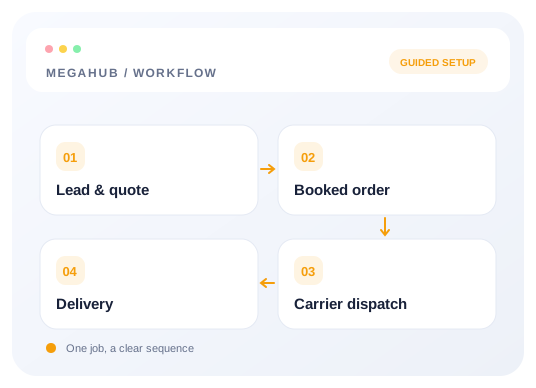
Understand the workflow
Prepare the enquiry before pricing
Review customer contact details, pickup and delivery locations, dates, and vehicles. Missing route or vehicle data should be resolved before relying on a quote total. Keep the customer enquiry connected to its quotes instead of recreating it for every pricing option.
Review the quote as a customer document
Check vehicle prices, header totals, fees, and the intended sender. Multiple options can belong to the same lead. Confirm the correct version before sending it so a customer is not asked to accept an outdated offer.
Separate booking from carrier dispatch
Follow the job’s record lifecycle. A booked customer order and a carrier dispatch are separate steps. Check the carrier and document requirements before posting or sending a dispatch sheet, and review any board error rather than assuming a listing succeeded.
Keep changes and delivery traceable
Split vehicles before dispatching if different trucks will carry them. Keep each resulting order’s records and paperwork consistent. Use the lifecycle and status references when deciding which action should happen next.
Choose your next guide
Detailed instructions, examples, and the checks to make along the way.
- GUIDE 01
Quoting: rate cards, vehicles and margin
How a price is built, where the numbers come from, and how the header and the vehicles stay in step.
6 min read - GUIDE 02
Getting your data out
CSV exports of leads, quotes and orders, and what the file contains.
3 min read - GUIDE 03
Lead to delivery: how a job moves
The five records an enquiry passes through, what each one is for, and what carries across.
7 min read - GUIDE 04
Dispatching: posting, offers and the sheet
Getting a booked order onto a truck — load boards, carrier checks, and what the driver receives.
7 min read - GUIDE 05
Splitting an order across two trucks
Moving some vehicles onto a second order without the totals drifting apart.
4 min read
Check your progress
Your setup checklist
Use this checklist while following the guide. Your selections are for this reading session and do not change CRM settings.
0 of 5 complete
Common questions, clear next steps
Open a question to find the check that helps you move forward.
Posting an order produced no board listing
Review the returned board error and the order’s listing state. A refused post should be investigated before repeating the action.
Can I split vehicles after dispatch?
Follow the split-order guide. Splitting must happen before dispatch so the driver’s documents describe the correct vehicles.
Where can I see the complete status list?
The status reference explains the values used across leads, quotes, orders, dispatches, and invoices. Use it together with the record lifecycle guide.