
MAKE THE NUMBERS CLEAR
Payments, paperwork, and a clear trail.
Configure payment methods, prepare invoices, and understand the difference between customer payments and your CRM subscription.
What you’ll learn
- Configure methods with appropriate team access
- Prepare and review customer invoices
- Understand stored-card and seat-billing rules
Before you begin
- Access to payment and invoice settings
- The intended processor account and credentials
- Your company’s invoicing and payment policies
The complete picture
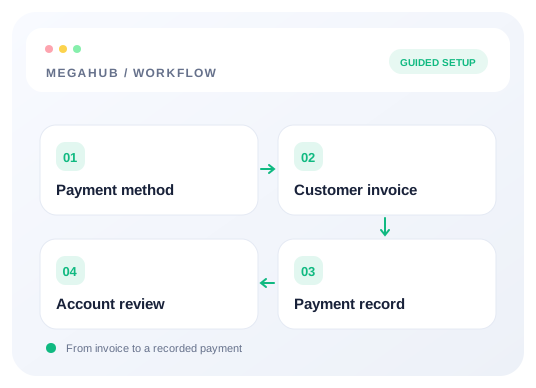
Understand the workflow
Configure the method before taking a payment
Use the payment-method guide for your processor’s fields. Keep methods disabled until their configuration is ready. Check availability to team leads separately: administrator access does not guarantee the same option appears for every role.
Review invoices before sending
Confirm the correct order, customer, amount, settlement account, and agent attribution. An invoice records what is due; do not assume creating or sending one collected the payment. Review the current payment state before asking a customer to pay again.
Understand stored cards and processors
A saved-card reference belongs to the processor that issued it. Follow the card guide for the current supported capture flow and limitations. Changing processors does not automatically make an old token usable with a new account.
Keep subscription billing separate
Seat billing describes what MegaHub charges the brokerage. Customer invoices and order payments describe money collected for transport work. Review active users and suspension behavior in the seat guide rather than changing customer records to resolve a subscription question.
Choose your next guide
Detailed instructions, examples, and the checks to make along the way.
- GUIDE 01
Setting up your payment methods
Which processors MegaHub supports, how to configure one, and how to decide who may use it.
6 min read - GUIDE 02
Raising and sending an invoice
Invoicing an order, choosing which account it settles into, and invoicing on an agent's behalf.
6 min read - GUIDE 03
Cards on file, and how card data is handled
What MegaHub stores when you save a customer's card, and what it deliberately never sees.
5 min read - GUIDE 04
How your MegaHub bill is worked out
What counts as a seat, what does not, and what happens when somebody leaves.
4 min read
Check your progress
Your setup checklist
Use this checklist while following the guide. Your selections are for this reading session and do not change CRM settings.
0 of 5 complete
Common questions, clear next steps
Open a question to find the check that helps you move forward.
A team lead cannot select a payment method
Check that the method is enabled and its availability to team leads is turned on. Administrators may see options unavailable to that role.
An invoice exists, but no payment is recorded
Creating an invoice does not prove collection. Review the actual payment or processor result and the supported recording workflow before retrying a charge.
Will cards transfer to another processor?
Processor tokens are specific to the issuing processor. Read the saved-card guide before changing accounts or assuming an existing reference can be charged.