
CONNECT YOUR SYSTEMS
Generating a posting key and endpoint
Create the credentials a lead provider needs, test them, and rotate them if they leak.
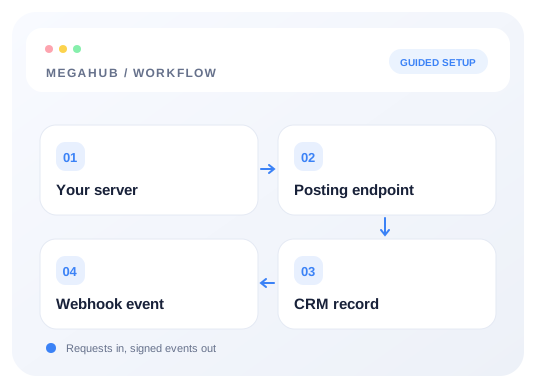
Every lead provider gets its own posting key. One per vendor, never a shared one — that is what lets you see which vendor sent what, apply a different limit to each, and switch one off without touching the others.
Creating one
- 1Open Settings → Lead sources.
- 2Add a source and name it after the vendor. Set its code and type, and enable Issue a posting key. The source name appears on every lead they send.
- 3Save. The key is shown once, at that moment.
- 4Copy it and send it to the vendor over whatever channel you would use for a password.
What to send the vendor
Two things — the URL and the key. The URL contains your brokerage's tenant key, which identifies you; the posting key identifies them.
Endpoint  POST https://megahubcrm.com/api/inbound/YOUR_TENANT_KEY
Header    X-Api-Key: lsk_xxxxxxxxxxxxxxxxxxxxxxxxxxxxxx
Content   application/json  (form-encoded also accepted)
Your tenant key is on Settings → Lead sources, above the list. It is not a secret in the way the posting key is — it identifies your brokerage but grants nothing on its own — though there is no reason to publish it either.
What they post
The body is JSON with eighteen standard string fields and an optional flat metadata object. A vendor who already posts to other brokerages almost certainly sends this shape already; it is the de-facto industry set.
{
  "name":              "Dana Whitfield",
  "first_name":        "Dana",
  "last_name":         "Whitfield",

  "email":             "dana@example.com",
  "phone":             "512-555-0142",

  "origin_zip":        "33101",
  "origin_city":       "Miami",
  "origin_state":      "FL",
  "destination_zip":   "30301",
  "destination_city":  "Atlanta",
  "destination_state": "GA",

  "vehicle_year":      "2022",
  "vehicle_make":      "Jeep",
  "vehicle_model":     "Wrangler",
  "operable":          "yes",

  "transport_type":    "open",
  "move_date":         "2026-03-14",
  "comments":          "Flexible by a few days either side.",
  "metadata":          { "Reference": "00123", "Budget": 850, "Flexible": true }
}Nothing else is required. A vendor who can only send a name, a phone number and two ZIPs is sending a workable lead:
{
  "name":            "Dana Whitfield",
  "phone":           "512-555-0142",
  "origin_zip":      "33101",
  "destination_zip": "30301"
}
Anything you send that is not on the list above is ignored rather than rejected — refusing a paid lead over a field nobody asked about would cost you the lead. That is also the trap: a vendor sending zipcode where MegaHub reads origin_zip gets a cheerful 201 and you get a lead with no route. The test endpoint below is how you catch that.
Additional information (metadata)
Metadata is optional: omitting it causes no metadata validation error. When supplied and valid, it is saved on the lead. Use application/json and send metadata as a flat object. It works on live, test and batch submissions (inside each lead), including the frontend /api/inbound/{tenantKey} routes. Up to 30 fields; labels match ^[A-Za-z][A-Za-z0-9 _-]{0,39}$, with constructor, prototype and __proto__ reserved. Values are single-line strings up to 160 characters, finite numbers within ±9007199254740991, or booleans. Dates use YYYY-MM-DD strings. Keep leading-zero references as strings. Zero and false are preserved.
{ "metadata": { "Reference": "00123", "Budget": 850, "Flexible": true, "Preferred date": "2026-10-20" } }Null, arrays, nested objects, multiline text and strings starting with { or [ after whitespace are rejected with 400 BAD_REQUEST. Do not send metadata as a JSON-encoded string in form data. Invalid metadata in a batch rejects the request before any leads are created. The test endpoint returns parsed.metadata. Metadata appears after Actions on the lead. Authenticated POST /api/v1/leads also accepts it; PATCH /api/v1/leads/{id} replaces the entire metadata object, omission leaves it unchanged, and {} clears it.
The whole round trip
One post, and what comes back from it. This is the exchange to hand a vendor.
curl -X POST https://megahubcrm.com/api/inbound/YOUR_TENANT_KEY \
  -H "X-Api-Key: lsk_your_posting_key" \
  -H "Content-Type: application/json" \
  -d '{
    "first_name": "Dana",
    "last_name": "Whitfield",
    "email": "dana@example.com",
    "phone": "512-555-0142",
    "origin_zip": "33101",
    "destination_zip": "30301",
    "vehicle_year": "2022",
    "vehicle_make": "Jeep",
    "vehicle_model": "Wrangler",
    "operable": "yes",
    "transport_type": "open",
    "move_date": "2026-03-14",
    "comments": "Flexible by a few days either side."
}'{
"accepted": true,
"leadNumber": 10482,
"leadId": "9f2c1b7e-4a3d-4c21-8f0e-2b6d5a91c3f4",
"duplicate": false
}Four fields, and that is all of it — a provider gets an acknowledgement, not the record. duplicate: true means the lead was accepted and also looks like one already on file; it is on the board either way, so treat it as accepted. leadNumber is the number an agent sees on screen, and worth storing on the vendor's side: it is what you both quote when querying a specific lead.
{
  "statusCode": 401,
  "errorCode": "INVALID_POSTING_KEY",
  "message": "The posting key is not valid for this endpoint.",
  "requestId": "0daa7354-dd2d-4932-9b72-ca72d6704260"
}
Tell the vendor to branch on errorCode, never on the message — the wording may be reworded, the code will not change. The requestId is what support needs to find one specific failed post in the log.
Test before you go live
There is a test endpoint that authenticates the same way, parses with the same code and resolves ZIPs against the same table, but writes nothing. Ask the vendor to point at it first.
curl -X POST https://megahubcrm.com/api/inbound/YOUR_TENANT_KEY/test \
  -H "X-Api-Key: lsk_your_posting_key" \
  -H "Content-Type: application/json" \
  -d '{
    "first_name": "Dana",
    "last_name": "Whitfield",
    "phone": "512-555-0142",
    "origin_zip": "33101",
    "destination_zip": "30301",
    "vehicle_year": "2022",
    "vehicle_make": "Jeep",
    "vehicle_model": "Wrangler",
    "move_date": "2026-03-14"
}'{
"sandbox": true,
"wouldCreate": false,
"source": "Central Leads Network",
"parsed": {
"firstName": "Dana", "lastName": "Whitfield",
"email": null, "phone": null,
"transportType": "OPEN", "readyDate": null,
"notes": null,
"vehicle": { "make": "Jeep", "model": "Wrangler", "operable": true, "vehicleClass": "SEDAN" }
},
"route": null,
"ignoredFields": ["zipcode", "dest", "customer_phone"],
"warnings": [
"No email or phone. A real post would be refused: a lead needs at least one.",
"origin_zip and destination_zip are both needed for a route. City and state are stored but not used to derive one."
]
}Three things to read, in this order. ignoredFields lists every key they sent that MegaHub does not read — above, the vendor sent customer_phone and zipcode, so the lead has no phone number and no route. wouldCreate says whether a real post would be accepted at all. warnings covers everything that would leave the lead thin without refusing it.
That first list is the important one. The most common integration fault is not a rejected post, it is a vendor sending zipcode where MegaHub reads origin_zip, getting a cheerful 201, and nobody noticing until an agent opens a lead with no route on it.
Rotating a key
Settings → Lead sources → the source → Rotate key. The old key stops working the instant the new one is issued, so arrange the swap with the vendor first — there is no grace period in which both work. Rotate whenever a key has been pasted somewhere it should not have been, or when somebody with access to it leaves.
Read next
Check your progress
Start with these steps
Use this checklist while following the guide. Your selections are for this reading session and do not change CRM settings.
0 of 4 complete