
BUILD YOUR WORKSPACE
A confident start. A connected team.
Set up the company, people, inboxes, and rules your brokerage needs before the first customer conversation.
What you’ll learn
- Set up a consistent company identity
- Give every teammate the right access
- Verify a complete customer workflow
Before you begin
- An owner or administrator account
- Your legal company details and logo
- A list of teammates and their responsibilities
The complete picture
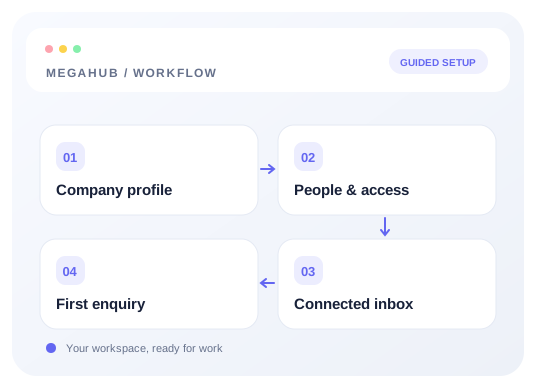
Understand the workflow
Start with the company
Enter the company identity used on quotes and paperwork. Review the legal name, address, contact information, and transport identifiers before asking agents to create customer-facing documents.
Give people a clear place to work
Invite teammates, choose roles, and organize teams. Roles control actions; team membership and assignment control which work is visible. Verify the setup from an agent account rather than assuming the administrator’s view is the same.
Connect communication before go-live
Set up each agent’s mailbox under Inbox → Mailboxes. For third-party mail, configure SMTP and IMAP and test both. Configure the brokerage’s outgoing account separately under Settings → Email.
Run one complete rehearsal
Submit a test enquiry, check the assignee, open the lead, and prepare a quote. Verify the sending mailbox before sending customer communications. Bring historical data in after your sources, users, and reference settings are ready.
Choose your next guide
Detailed instructions, examples, and the checks to make along the way.
- GUIDE 01
Your first week on MegaHub
The order to do things in, so nothing is blocked on something you have not set up yet.
5 min read - GUIDE 02
Roles, teams and who sees what
How visibility works, and which role to give somebody so they can do their job and no more.
5 min read - GUIDE 03
Adding your teammates
Inviting somebody, what the invitation link is, and what to do when the email never arrives.
5 min read
Check your progress
Your setup checklist
Use this checklist while following the guide. Your selections are for this reading session and do not change CRM settings.
0 of 5 complete
Common questions, clear next steps
Open a question to find the check that helps you move forward.
A menu is missing for a teammate
Check their role and permissions with an administrator. A menu visible to an owner may be unavailable to an agent.
An invitation did not arrive
Check the email address and spam folder, then follow the teammate invitation guide. Never forward another user’s invitation to solve the problem.
What should I configure first?
Start with company details and people, then communication, lead intake, distribution, and quoting. Import history once your reference data is ready.