
CONNECT YOUR SYSTEMS
Clear contracts. Reliable connections.
Use posting keys, test endpoints, and signed webhooks to connect the CRM with your own systems.
What you’ll learn
- Authenticate each provider separately
- Understand single and batch responses
- Verify webhook messages before processing them
Before you begin
- An administrator who can configure the integration
- A server-side place to keep credentials
- Access to request and response logs with secrets redacted
The complete picture
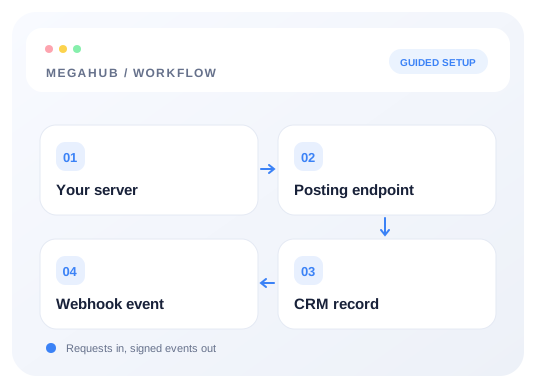
Understand the workflow
Separate incoming and outgoing integrations
Inbound lead endpoints receive enquiries from your provider or website. Webhooks notify your system after CRM events. They serve different directions and use different authentication; a posting key is not a webhook signing secret.
Start with a single request
Create a source key, validate a representative payload, then submit one live lead. Inspect the acknowledgement instead of treating any response as success. The API reference lists accepted fields, response shapes, and endpoint limits.
Enable batch posting deliberately
Batch posting is off until it is enabled for a source. Respect that source’s configured limit and the 200-entry maximum. A 207 response contains individual results: keep successful records and investigate rejected entries by index.
Build webhook verification and recovery
Verify the signature against the timestamp and raw request body before parsing or processing the event. Return a successful response promptly and move heavier work to your queue. Expect retries and make event handling safe to repeat.
Choose your next guide
Detailed instructions, examples, and the checks to make along the way.
- GUIDE 01
Generating a posting key and endpoint
Create the credentials a lead provider needs, test them, and rotate them if they leak.
5 min read - GUIDE 02
Inbound lead API reference
Endpoint, authentication, every field MegaHub reads, batch posting and the responses to expect.
9 min read - GUIDE 03
Webhooks: being told when something happens
Have MegaHub post to your own system when a lead arrives, an order ships or a payment clears.
6 min read
Check your progress
Your setup checklist
Use this checklist while following the guide. Your selections are for this reading session and do not change CRM settings.
0 of 5 complete
Common questions, clear next steps
Open a question to find the check that helps you move forward.
Authentication returns 401
Check both the tenant key in the URL and the source key in X-Api-Key. Confirm the source is active and the key has not been replaced.
A webhook signature differs
Use the exact raw body bytes and timestamp from the request. Parsing and re-serializing JSON changes the input and can invalidate the signature.
Only part of a batch arrived
Read every entry in the 207 response. Accepted and rejected leads are reported independently; avoid repeating the whole accepted batch.