MegaHub CRM · Transport workflows
Auto transport CRM for car shipping teams
Connect lead intake, customer conversations, quotes, and operational handoffs in one brokerage workflow.
Request a product demo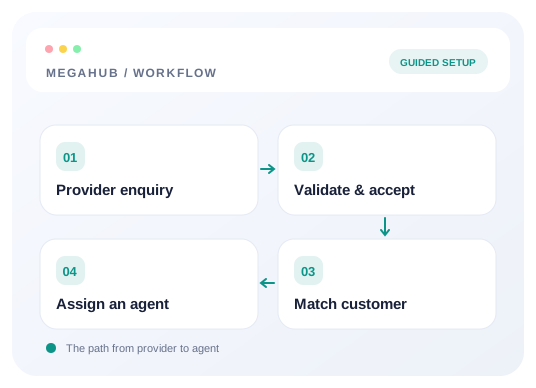
Start with a usable enquiry
An auto transport CRM begins with the information an agent needs to act: the customer, the vehicle, the pickup and delivery locations, and the requested move date. MegaHub supports provider intake, manual lead creation, and imports. Before connecting a source, agree on the fields it will send and the acknowledgement it expects. A successful test should leave an enquiry that someone can find and work, rather than only a successful network request. Review missing route details before preparing a quote.
Connect providers deliberately
Provider intake uses a posting URL and an active source key. This is a separate connection from an email inbox. Give the provider the documented endpoint and authentication header, then send a controlled test with a recognizable customer name. Read the returned acknowledgement and find the resulting lead in the brokerage workspace. If a request is rejected, inspect the response and source configuration before repeating it. The help centre explains the accepted fields, duplicate handling, and common integration errors.
Keep the customer conversation together
Car shipping CRM work depends on context across more than one enquiry. Customer records give the team somewhere to review contact information alongside the work associated with that customer. A matched customer and a possible duplicate lead deserve different decisions: one identifies the person, while the other asks whether the enquiry is repeated. Review both before assigning follow-up. Keep corrections in the appropriate record so the next agent does not have to reconstruct the conversation from an unrelated spreadsheet or personal inbox.
Give each lead an accountable owner
Lead distribution is a workflow decision, not just a connection setting. The application includes assignment rules and team management so a brokerage can organize incoming work. Decide who handles each source, how agents cover a shared queue, and what should happen outside their working hours. Test those choices with an actual incoming enquiry. After assignment, the agent should know the next action and have enough contact and route information to take it. Review unassigned work as part of daily operations.
Move from enquiry to quote
Quoting needs a clear route, vehicle details, timing, and commercial assumptions. MegaHub includes quotes and related customer-facing workflows, allowing the team to carry an enquiry into a more concrete proposal. Use the quote to explain the shipment under discussion and review it before sharing it. A request for an estimate is not automatically a dispatch instruction. Confirm what the customer has accepted and what still requires a decision before the brokerage moves the job into its operational workflow.
Connect sales work with operations
Once a shipment progresses, orders and dispatch give the operations team a place to manage the next stage. A useful handoff explains what was agreed, which details remain uncertain, and who should contact the customer if the plan changes. The CRM should support that handoff instead of encouraging a second disconnected record. Review the customer, vehicle, route, and dates together. Any new information discovered during carrier coordination should be reflected in the working shipment so sales and operations can discuss the same job.
Set up email as a complete connection
Outbound SMTP and inbound IMAP serve different purposes. A third-party inbox needs the correct connection for sending as well as the configuration for receiving messages. Provider templates can reduce manual entry where available, but credentials, mailbox permissions, and provider requirements still need verification. Follow the email setup guide, confirm the sending account, and check incoming mail separately. Connecting email does not turn provider enquiries into leads automatically; configure the lead intake integration independently and test both workflows with deliberate examples.
Evaluate the workflow before rollout
Use a small, controlled rollout to assess the auto transport broker software with the people who will use it. Bring a representative enquiry, prepare a quote, and walk through the operational handoff. Confirm access permissions and identify which team owns each next action. Use the reporting screens to review the resulting activity rather than assuming every operational question has a ready-made report. Document unresolved requirements and ask for a demonstration of those exact workflows before expanding the setup to additional agents or providers.
Frequently asked questions
How can I evaluate this workflow?
Request a demo using a representative shipment and the team roles, provider connections, and customer actions you need to verify.
Where can I find setup instructions?
The public help centre covers provider intake, email connections, permissions, API requests, and operational setup. Start with the topic that matches your next task.
Are public subscription prices available?
Verified public plan details are not published here. Contact info@megahubcrm.com to discuss your requirements and pricing.