
FROM ENQUIRY TO OPPORTUNITY
Every enquiry has a next step.
Connect providers, verify incoming data, and route each lead to the team that can work it.
What you’ll learn
- Connect a source with its own posting key
- Test fields before sending live enquiries
- Find and resolve unassigned or duplicate work
Before you begin
- Access to lead-source settings
- A provider or website server that can submit requests
- A sample payload with email or phone and both ZIPs
The complete picture
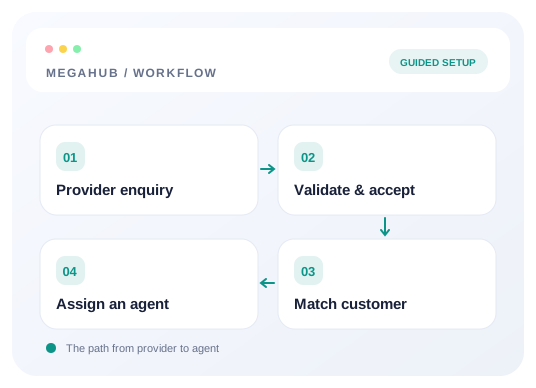
Understand the workflow
Create a source for each channel
Use separate lead sources for separate vendors or websites. Source names appear on incoming records, and distinct posting keys let you stop or rotate one integration without interrupting the others.
Prove the mapping before going live
Call the /test endpoint with the same payload the provider will send. Check parsed contact details, route, ignoredFields, and warnings. A request can be accepted even when useful information is missing or mapped under an unrecognized field name.
Make one live enquiry traceable
Post to the live URL without /test. Keep the acknowledgement’s lead number and ID. Find that record in Leads and compare its source, contact, route, and vehicle with the original submission.
Make assignment part of the test
Check source-to-team mapping, distribution rules, working hours, active membership, and lead caps. If nobody is eligible, investigate the unassigned pool rather than creating another copy of the enquiry.
Choose your next guide
Detailed instructions, examples, and the checks to make along the way.
- GUIDE 01
Connect a provider and land your first lead
Create a lead source, share its posting credentials, test the payload, and confirm the lead reaches an agent.
10 min read - GUIDE 02
Troubleshoot lead delivery and assignment
Find whether an enquiry failed authentication, mapped incorrectly, stayed unassigned, or is hidden by permissions.
6 min read - GUIDE 03
How MegaHub CRM lands a lead
What happens between a provider posting an enquiry and an agent seeing it on their board.
6 min read - GUIDE 04
Setting up your lead sources
Creating a source, what each field changes, and what happens to a provider when you switch one off.
6 min read - GUIDE 05
Deciding which agent gets a lead
How an inbound lead finds a desk, how a ratio is honoured when leads arrive one at a time, and what happens when nobody is eligible.
6 min read
Check your progress
Your setup checklist
Use this checklist while following the guide. Your selections are for this reading session and do not change CRM settings.
0 of 5 complete
Common questions, clear next steps
Open a question to find the check that helps you move forward.
The request succeeded, but there is no lead
If you used /test, no record is created. For a live acknowledgement, search by its lead number, clear filters, and check permissions and assignment.
The route is empty
Send origin_zip and destination_zip using those exact field names. City and state are retained but do not substitute for the ZIPs when resolving the route.
A lead is marked duplicate
The enquiry was still accepted. Review the matched customer’s earlier work before contacting them twice; do not resend an accepted record to fix its assignment.