
CONNECT YOUR SYSTEMS
Inbound lead API reference
Endpoint, authentication, every field MegaHub reads, batch posting and the responses to expect.
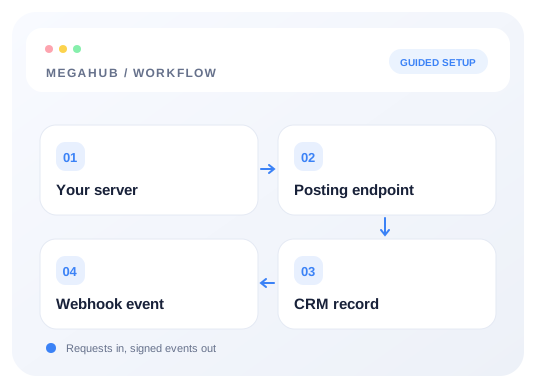
Written for whoever is doing the integration at the vendor's end. Everything here is a public endpoint — no user session is involved, because a lead provider cannot hold one.
Endpoints
| Method and path | What it does | Success |
|---|---|---|
| POST /api/inbound/{tenantKey} | Creates one lead | 201 Created |
| POST /api/inbound/{tenantKey}/batch | Creates up to the vendor's batch limit | 207 Multi-Status |
| POST /api/inbound/{tenantKey}/test | Validates a post, writes nothing | 200 OK |
Use the public website at https://megahubcrm.com with the /api/inbound paths above. Copy your exact posting URL from Settings → Lead sources; use the same URL with /test or /batch appended for those endpoints.
Authentication
The posting key goes in an X-Api-Key header. The tenant key goes in the path. Both must match an active lead source, or the request is refused with 401 and errorCode INVALID_POSTING_KEY.
Fields
Send what you have; anything missing is simply absent, and unrecognised top-level fields are kept only in the raw payload. The eighteen standard fields are strings, including year and operable. The optional metadata object preserves short text, numbers and booleans in the lead’s Additional information card.
| Field | Max | Notes |
|---|---|---|
| name | 200 | Full name. Split on the first space into first and last, and only used when those are absent. |
| first_name | 100 | Wins over name. |
| last_name | 100 | Wins over name. |
| 255 | Lowercased on the way in. One of email or phone is required. | |
| phone | 40 | Any format. Used to match an existing customer. One of email or phone is required. |
| origin_zip | 10 | Digits are extracted and the first five used. This is what resolves the pickup. |
| destination_zip | 10 | As above, for the delivery. |
| origin_city | 100 | Stored on the raw payload, but not used to work out the route. |
| origin_state | 40 | As above. |
| destination_city | 100 | As above. |
| destination_state | 40 | As above. |
| vehicle_year | 10 | A string, not a number. Anything non-numeric is dropped. |
| vehicle_make | 60 | One vehicle per lead through this endpoint. |
| vehicle_model | 80 | Also used to guess the size class — sedan unless the model says otherwise. |
| operable | 10 | no, false, 0, n, inop, inoperable all mean it does not run. Anything else, including an absent field, means it does. |
| transport_type | 20 | Anything containing "enclosed" is enclosed. Everything else, including an absent field, is open. |
| move_date | 40 | When the customer wants it collected. Anything unparseable is dropped rather than guessed. |
| comments | 2000 | Free text. Lands on the lead as a note. |
| metadata | 30 fields | Flat object of short strings, finite numbers or booleans. Appears under Additional information. |
Additional information (metadata)
Metadata is optional: omitting it causes no metadata validation error. When supplied and valid, it is saved on the lead. Use application/json and send metadata as a flat object. It works on live, test and batch submissions (inside each lead), including the frontend /api/inbound/{tenantKey} routes. Up to 30 fields; labels match ^[A-Za-z][A-Za-z0-9 _-]{0,39}$, with constructor, prototype and __proto__ reserved. Values are single-line strings up to 160 characters, finite numbers within ±9007199254740991, or booleans. Dates use YYYY-MM-DD strings. Keep leading-zero references as strings. Zero and false are preserved.
{ "metadata": { "Reference": "00123", "Budget": 850, "Flexible": true, "Preferred date": "2026-10-20" } }Null, arrays, nested objects, multiline text and strings starting with { or [ after whitespace are rejected with 400 BAD_REQUEST. Do not send metadata as a JSON-encoded string in form data. Invalid metadata in a batch rejects the request before any leads are created. The test endpoint returns parsed.metadata. Metadata appears after Actions on the lead. Authenticated POST /api/v1/leads also accepts it; PATCH /api/v1/leads/{id} replaces the entire metadata object, omission leaves it unchanged, and {} clears it.
Over-length values are refused with a 400 rather than truncated, so a comments field of 3,000 characters loses the whole post. Leading and trailing whitespace is trimmed from standard string fields. Metadata values retain their types and text.
A single lead
curl -X POST https://megahubcrm.com/api/inbound/YOUR_TENANT_KEY \
  -H "X-Api-Key: lsk_your_posting_key" \
  -H "Content-Type: application/json" \
  -d '{
    "first_name": "Dana",
    "last_name": "Whitfield",
    "email": "dana@example.com",
    "phone": "512-555-0142",
    "origin_zip": "33101",
    "destination_zip": "30301",
    "vehicle_year": "2022",
    "vehicle_make": "Jeep",
    "vehicle_model": "Wrangler",
    "operable": "yes",
    "transport_type": "open",
    "move_date": "2026-03-14",
    "comments": "Flexible by a few days either side."
}'{
"accepted": true,
"leadNumber": 10482,
"leadId": "9f2c...",
"duplicate": false
}duplicate: true means the lead was accepted and flagged as looking like one already on file. It is on the board either way — treat it as accepted.
Batches
Batch posting is off until the brokerage enables it for your key and sets how many leads you may send at once. Send a leads array; each entry is accepted or rejected on its own, and the response says which by position. One malformed entry never costs you the rest of the batch.
curl -X POST https://megahubcrm.com/api/inbound/YOUR_TENANT_KEY/batch \
  -H "X-Api-Key: lsk_your_posting_key" \
  -H "Content-Type: application/json" \
  -d '{
    "leads": [
      { "first_name": "Dana",  "phone": "512-555-0142",
        "origin_zip": "33101", "destination_zip": "30301",
        "vehicle_year": "2022", "vehicle_make": "Jeep", "vehicle_model": "Wrangler" },
      { "first_name": "Rudy",  "email": "rudy@example.com",
        "origin_zip": "60601", "destination_zip": "85004",
        "vehicle_year": "2019", "vehicle_make": "Ford", "vehicle_model": "Escape" }
    ]
}'{
"accepted": 2,
"rejected": 1,
"results": [
{ "index": 0, "accepted": true, "leadNumber": 10483, "leadId": "...", "duplicate": false },
{ "index": 1, "accepted": false, "error": "A lead needs an email or a phone number." },
{ "index": 2, "accepted": true, "leadNumber": 10484, "leadId": "...", "duplicate": true }
]
}Limits
| Limit | Value |
|---|---|
| Single and test endpoints | 300 requests a minute |
| Batch endpoint | 60 requests a minute |
| Leads per batch | Set per key by the brokerage; hard ceiling of 200 |
| Leads per hour | Optional, set per key. 429 when exceeded. |
An hourly limit refuses the whole batch rather than part of it, and the error says how many you have sent this hour. Half a post landing is worse than none: you cannot tell which half without reading every result, and your retry would duplicate whatever got through.
The sandbox
Same authentication, same parsing, same ZIP lookup — and it writes nothing. Post the exact body you intend to send live and read what comes back before you go anywhere near the live path.
curl -X POST https://megahubcrm.com/api/inbound/YOUR_TENANT_KEY/test \
  -H "X-Api-Key: lsk_your_posting_key" \
  -H "Content-Type: application/json" \
-d '{ "first_name": "Dana", "zipcode": "33101", "dest": "30301" }'{
"sandbox": true,
"wouldCreate": false,
"source": "Central Leads Network",
"parsed": {
"firstName": "Dana", "lastName": null,
"email": null, "phone": null,
"transportType": "OPEN", "readyDate": null,
"notes": null, "vehicle": { "operable": true, "vehicleClass": "SEDAN" }
},
"route": null,
"ignoredFields": ["zipcode", "dest"],
"warnings": [
"No email or phone. A real post would be refused: a lead needs at least one.",
"origin_zip and destination_zip are both needed for a route. City and state are stored but not used to derive one.",
"No vehicle make or model. The lead is accepted but an agent cannot quote it without ringing back."
]
}ignoredFields is the one to read first. It lists every key you sent that MegaHub does not read — above, a provider sending zipcode and dest would have got a cheerful 201 from the live endpoint and produced a lead with no route on it. wouldCreate tells you whether a real post would be accepted at all; warnings covers everything that would make the lead thin without refusing it.
Errors
{
  "statusCode": 401,
  "errorCode": "INVALID_POSTING_KEY",
  "message": "The posting key is not valid for this endpoint.",
  "requestId": "0daa7354-dd2d-4932-9b72-ca72d6704260"
}
Match on errorCode rather than the message — the wording may be improved, the code will not change. Quote the requestId if you ask support about a specific failed post; it is what finds it in the log.
| Status | errorCode | Meaning |
|---|---|---|
| 401 | INVALID_POSTING_KEY | Tenant key or posting key is wrong, or the source is switched off. |
| 403 | BATCH_NOT_ENABLED | This key may only send one lead per request. |
| 400 | BATCH_TOO_LARGE | More leads than this key is allowed to send at once. |
| 429 | HOURLY_LIMIT_REACHED | This key's hourly ceiling. Retry later. |
Read next
Check your progress
Review your setup
Use this checklist while following the guide. Your selections are for this reading session and do not change CRM settings.
0 of 5 complete